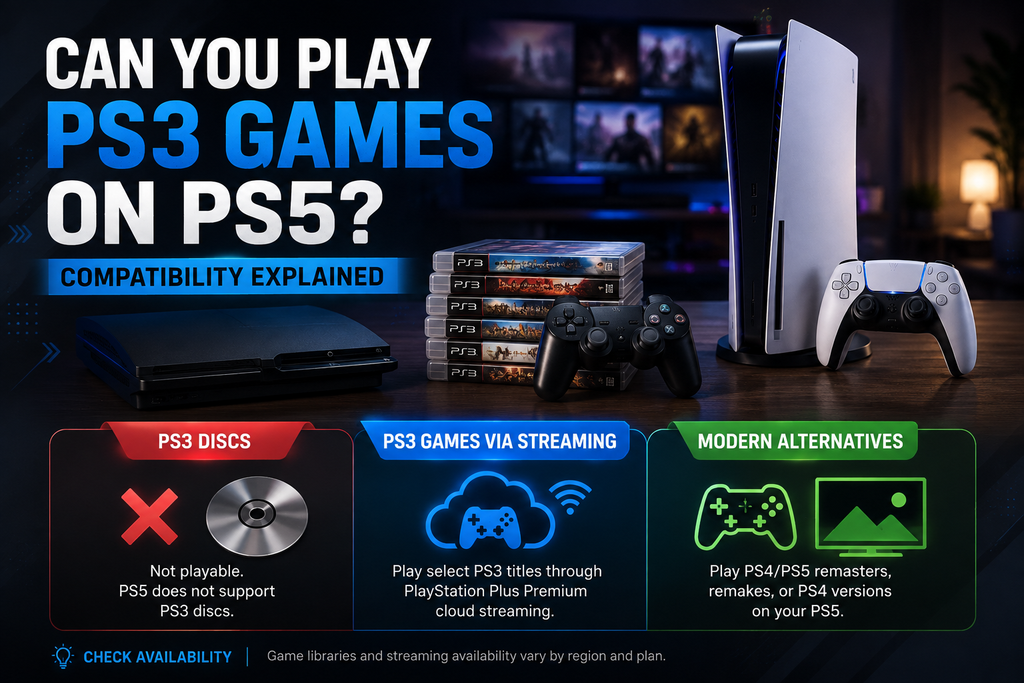
he PS5 does not natively support PS3 game discs, and you cannot simply insert an old PS3 disc and expect the console to run it. Sony’s current backward compatibility support is focused heavily on PS4 games, while original PS3 titles are handled differently.
There is, however, an important exception: select PS3 games can be played on a PS5 through PlayStation Plus cloud streaming, where the game is run remotely rather than directly from the console’s hardware. Sony’s PlayStation Plus information specifically identifies PS3 games in the Classics Catalog as streaming titles.
That distinction is the key to understanding PS3 games on PS5.
If you have a shelf full of PS3 discs, the answer is disappointing: the PS5 cannot use those discs as native PS3 software. If you’re trying to revisit a particular PS3 era game, though, there may be another route through streaming, a remaster, or a PS4 version.
Can You Play PS3 Games on PS5? The Short Answer
No, PS5 consoles cannot natively play original PS3 games from PS3 discs.
Sony’s official PS5 backward compatibility documentation states that PS5 consoles do not support PlayStation 3 discs. The same documentation explains that PS5 backward compatibility primarily covers the overwhelming majority of PS4 games.
There are three practical situations to remember:
| What you own | Can you use it on PS5? | How? |
|---|---|---|
| Original PS3 disc | ❌ No | PS5 doesn’t support PS3 discs |
| Original PS3 digital game | ❌ Not as a native PS5 download | Ownership does not automatically turn it into a PS5 version |
| Select PS3 game in PS Plus Classics Catalog | ✅ Yes | Cloud streaming where supported |
| PS3 game with a PS4/PS5 remaster | ✅ Yes | Play the modern version |
| PS4 version of a game originally released on PS3 | ✅ Usually | PS5 supports the vast majority of PS4 games |
The last two categories are particularly useful because many older PlayStation games eventually received remasters or PS4 releases.
Why PS5 Doesn’t Natively Play PS3 Games
The biggest misconception surrounding this subject is assuming that backward compatibility is simply a matter of making newer hardware powerful enough to run older software.
It isn’t that simple.
PS3 discs are not supported
The most straightforward limitation is physical media.
If you own a PS3 Blu ray disc, inserting it into a PS5 will not turn that game into playable PS5 software. Sony explicitly states that PS5 consoles do not support PS3 discs.
This also means buying a PS5 with a disc drive does not solve the problem.
The disc drive can be useful for supported PS4 and PS5 physical games, but it doesn’t provide native PS3 compatibility.
That’s an important distinction for collectors. A PS5 disc drive isn’t a universal PlayStation retro reader.
Digital PS3 purchases aren’t automatically PS5 games
Another common assumption is that owning a PS3 game digitally should allow you to download it on PS5.
That’s not generally how Sony handles original PS3 software.
The PS5’s downloadable backward compatible library isn’t simply a mirror of every game ever sold digitally on PS3. Sony’s current PlayStation Plus system instead provides access to selected older titles through the Classics Catalog, including PS3 games that are available via streaming.
So if you previously bought a PS3 game, don’t assume that signing into the same PlayStation account will automatically put a PS5 version in your library.
The game needs to have an appropriate modern release or be offered through a compatible service.
How to Play Select PS3 Games on PS5
If native backward compatibility isn’t available, what options do you actually have?
There are two main legitimate approaches.
First: stream a supported PS3 game through PlayStation Plus Premium.
Second: play a remastered or modern version of the game that was released for PS4 or PS5.
These approaches feel similar from a player’s perspective because you’re playing an older game on newer hardware, but technically they work very differently.
PlayStation Plus Premium streaming
PlayStation Plus Premium provides cloud streaming for selected games in supported markets. Sony’s PlayStation Plus information specifically states that the Classics Catalog includes PS3 games that are available via streaming.
On a compatible PS5, the basic process is straightforward:
- Sign in to your PlayStation account.
- Open PlayStation Plus.
- Browse the Classics Catalog.
- Find a PS3 title that supports streaming.
- Select Stream.
- Wait for the streaming session to begin.
Sony’s support documentation gives essentially this process for streaming eligible Classics Catalog games on PS5.
The important word is eligible.
You can’t select any PS3 game ever released and expect it to appear in the catalog. Availability depends on the title, PlayStation Plus plan, and market.
The catalog can also change over time, so a game being available at one point doesn’t necessarily guarantee permanent inclusion.
Remasters and PS4 versions
For some games, streaming isn’t necessary because the publisher released a newer version.
A PS3 era game may have received:
- A PS4 remaster
- A PS5 remaster
- A remake
- A PS4 port
- A collection containing multiple games
If the game has a PS4 version, the situation becomes much easier because PS5 supports the overwhelming majority of PS4 games. Sony says more than 4,000 PS4 games are playable across PS4 and PS5, with selected titles benefiting from PS5 Game Boost.
For example, instead of attempting to run an original PS3 release directly, you may be able to purchase or play its later PS4 version on your PS5.
This is often the better option if you want a locally installed game rather than a streamed one.
How PS3 Game Streaming Works on PS5
Streaming is fundamentally different from backward compatibility.
With native backward compatibility, the PS5 would actually run the game locally.
With cloud streaming, the game runs on remote PlayStation hardware and sends the resulting video and audio to your PS5 over the internet. Your controller inputs travel back to the service.
That distinction creates both advantages and disadvantages.
The advantages
The biggest benefit is obvious: you don’t need PS3 hardware.
You also don’t need a PS3 disc for a game that is available through the supported streaming catalog.
Sony says PlayStation Plus Premium cloud streaming requires broadband internet with a minimum of 5 Mbps upload and download speed to establish a streaming session.
Streaming can also save local storage because the game doesn’t have to be installed in the conventional way.
The drawbacks
Cloud gaming depends heavily on your internet connection.
A connection can meet the minimum requirement and still produce a less than ideal experience if it has:
- High latency
- Packet loss
- Unstable WiFi
- Network congestion
- Sudden bandwidth drops
For action games, fighting games, shooters, and other timing sensitive titles, latency can be more noticeable than it is in slower paced games.
Sony also documents limitations affecting certain features while streaming, including Share Play, Share Screen, Remote Play, some camera functions, keyboard and mouse support, and other features.
In other words, streaming is a useful solution, but it isn’t exactly the same as owning and running a local PS5 version.
What Happens to Your Old PS3 Discs and Purchases?
This is where expectations matter.
If you own a PS3 disc, you still have a PS3 game. The PS5 doesn’t convert it into a digital entitlement simply because the disc exists.
Sony’s current PS5 backward compatibility support does not include PS3 discs.
That means a PS3 collector who wants to continue playing physical games should generally keep their PS3 hardware.
There is also a broader point about the PS3 ecosystem: access to the original hardware remains relevant for games that haven’t received modern versions or aren’t included in streaming catalogs.
Sony currently states that existing PS3 content can continue to be played, while also announcing a future change to the PS3 and PS Vita stores in its regional support information. The company says that starting July 2027, new purchases through PlayStation Store on PS3 and PS Vita will close in its region, while previously purchased content will remain playable and downloadable for the foreseeable future.
That makes it increasingly important for PS3 owners to distinguish between owning an older game and having a modern way to play that game.
PS3 vs PS4 Versions on PS5
If a game originally appeared on PS3 but later received a PS4 release, the PS4 version is usually the more convenient choice for a PS5 owner.
Why?
Because the PS5 was designed to support the vast majority of PS4 games. Sony’s compatibility documentation confirms that thousands of PS4 titles can be played on PS5.
A later version can also provide practical improvements such as:
- Higher resolution
- Improved frame rate performance
- Faster loading
- Updated textures
- Modern controller support
- Additional content
- Trophy support specific to the newer release
The exact improvements depend on the game, so it would be wrong to assume every remaster received the same treatment.
This is also why searching for a PS4 or PS5 version can be more productive than searching specifically for PS3 backward compatibility.
If the game has a modern port, you may have a much better route than trying to get the original PS3 release working.
Common Mistakes to Avoid
Mistake 1: Assuming the PS5 disc drive supports every PlayStation disc
It doesn’t.
PS3 discs are specifically excluded from PS5 backward compatibility.
Mistake 2: Assuming every PS3 game is on PlayStation Plus
The Classics Catalog contains selected titles, not the entire PS3 library.
Sony describes PS3 Classics Catalog games as streaming titles, and catalog availability varies.
Mistake 3: Confusing a remaster with backward compatibility
If you play a PS3 game through a PS4 remaster, you’re not actually running the original PS3 version on the PS5.
You’re playing the newer release.
That distinction matters when comparing graphics, controls, trophies, DLC, save compatibility, and online functionality.
Mistake 4: Assuming an old PS3 save will automatically transfer
Save compatibility depends on the particular game and the version you’re moving between.
A PS3 save isn’t automatically interchangeable with every later PS4 or PS5 release.
Mistake 5: Buying a PS5 disc model specifically for PS3 games
A disc drive PS5 is useful for compatible physical games, but it does not provide native PS3 disc support.
If your main reason for buying a PS5 is playing an old PS3 collection, check the specific games first.
Is PlayStation Plus Premium Worth It for PS3 Games?
If your main goal is accessing supported PS3 classics, PlayStation Plus Premium can be useful because cloud streaming gives PS5 owners a way to experience selected PS3 games without maintaining original PS3 hardware.
But it shouldn’t be viewed as a replacement for the entire PS3 library.
The value depends heavily on the games you actually want to play.
Before subscribing, check whether your specific titles are currently included in the Classics Catalog. Sony provides a searchable PlayStation Plus games catalog, and the company notes that catalog games can have removal dates.
There’s another regional consideration too.
PlayStation Plus benefits and streaming availability vary by market. Sony has historically offered different membership structures and streaming availability depending on region.
So don’t rely on a list you find online from another country. Check the PlayStation Store or PlayStation Plus catalog associated with your own account.
Are PS3 Games Coming to Native PS5 Backward Compatibility?
There is currently an important difference between streaming PS3 games and native PS3 backward compatibility.
Sony’s current official PS5 support documentation does not announce native support for PS3 discs. It specifically says PS3 discs aren’t supported, while its standard backward compatibility feature focuses on PS4 games.
At the same time, Sony continues to offer selected PS3 games through the PlayStation Plus Classics Catalog via streaming.
So if you’re waiting for a system update that will suddenly allow you to insert your entire PS3 collection into a PS5, there is no confirmed announcement establishing that feature.
Rumors and speculation about future backward compatibility should not be confused with an official Sony announcement.
For now, the practical choices remain streaming, remasters, modern ports, or original PS3 hardware.
What Is the Best Way to Play PS3 Games in 2026?
There isn’t one answer for every player.
If you already own PS3 discs: keep your PS3 if you want to play those exact physical releases. The PS5 cannot use the discs directly.
If your game is available through PlayStation Plus: streaming is the easiest way to play it on a PS5 without keeping PS3 hardware connected.
If the game has a PS4 remaster: that is often the most convenient option because PS5 supports the vast majority of PS4 games.
If the game has a native PS5 remake or remaster: that version is usually the most modern way to experience it, although it may differ substantially from the original.
If none of these options exist: the original PS3 may still be your best route.
This is especially important for obscure PS3 games that never received ports or remasters. Modern PlayStation hardware can’t automatically solve availability for every game from an older generation.
What About PS3 Controllers on PS5?
The controller situation is another reason that playing a modern version isn’t identical to playing the original.
The PS5 is built around the DualSense controller, and Sony’s current PS5 documentation focuses on PS4 and PS5 compatibility rather than treating the PS3’s original controller ecosystem as a native PS5 feature.
For streamed PS3 games, Sony’s support documentation specifically explains that PS3 controls such as the original START and SELECT functions are mapped to the DualSense touchpad: clicking the left side corresponds to SELECT, while clicking the right side corresponds to START.
That’s a small detail, but it makes a difference when playing older games that were designed around the DualShock 3’s button layout.
Final Verdict
So, can you play PS3 games on PS5?
Yes, but not through native PS3 backward compatibility.
The PS5 cannot play original PS3 discs, and owning a PS3 game doesn’t automatically turn it into a downloadable PS5 title. Sony’s official compatibility documentation specifically excludes PS3 discs from PS5 support.
However, selected PS3 games are available through PlayStation Plus Classics Catalog streaming on PS5, while other PS3 era games can be played through PS4 or PS5 remasters, remakes, and ports.
For most players, the smartest approach is simple: check the exact game before buying anything. If it has a PS5 version, PS4 version, or supported PS Plus streaming release, you have a modern option. If it only exists as an original PS3 release, your PS3 remains the hardware you need.
The PS5 is excellent at carrying the PS4 library forward, but it isn’t a universal PS3 replacement. Knowing that distinction can save you from buying a PS5 expecting your old PS3 collection to work immediately.
FAQ
Can you play PS3 games on PS5 with a disc?
No. PS5 consoles do not support original PS3 discs. A PS3 disc cannot simply be inserted into a PS5 to play the game.
Can you download PS3 games directly onto PS5?
Original PS3 games aren’t generally downloadable as native PS5 games. However, selected PS3 titles are available through PlayStation Plus Classics Catalog streaming.
Can PS5 play PS3 games without a PS3?
Yes, for selected games. PlayStation Plus Premium provides cloud streaming for supported PS3 titles in the Classics Catalog, subject to availability in your market.
Do I need PlayStation Plus Premium to stream PS3 games?
For PS3 games available through the PlayStation Plus Classics Catalog’s streaming service, the required higher tier PlayStation Plus membership is needed. Sony identifies cloud streaming as a Premium benefit in supported markets.
Can you play PS3 games on PS5 without internet?
Not when using cloud streaming. Streaming requires an internet connection, and Sony specifies a minimum 5 Mbps upload and download connection to establish a cloud streaming session.
If the game has a downloadable PS4 or PS5 version, however, that version can generally be installed locally.
Can I play a PS3 game if it has a PS4 version?
Yes. If a PS3 era game received a compatible PS4 release, you can generally play that PS4 version on PS5 because the PS5 supports the overwhelming majority of PS4 games.
Will PS3 games ever get native PS5 backward compatibility?
There is currently no official announcement establishing native PS3 disc compatibility on PS5. Sony continues to support selected PS3 games through cloud streaming instead.
Is a PS5 Digital Edition able to play PS3 games?
The PS5 Digital Edition cannot play physical PS3 discs because it has no disc drive, and the standard PS5 also does not support PS3 discs. Selected PS3 games can instead be accessed through supported streaming options.
LEAVE A PIXEL ZINE COMMENT