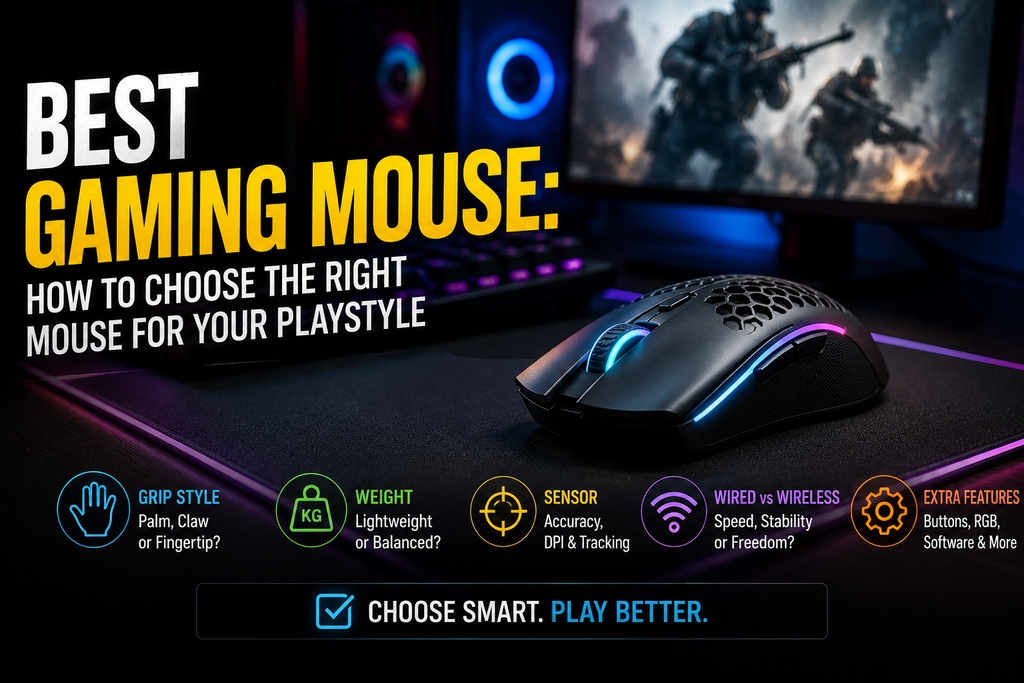
Search intent: Mixed, with strong commercial intent. People searching for the best gaming mouse usually want to compare leading options, understand the differences between mouse types, and decide which model suits their games, hand size, grip, and budget.
The most useful angle is not to pretend that one mouse is perfect for everyone. A lightweight competitive FPS player, an MMO player who needs many programmable buttons, and someone who uses the same mouse for work and gaming may need completely different hardware.
What Actually Makes the Best Gaming Mouse?
The best gaming mouse is the one that matches your hand, grip style, preferred games, and desk setup. A mouse with the highest DPI or the most expensive sensor is not automatically the right choice. Modern gaming mice are already extremely accurate, so shape, weight, button placement, connectivity, and comfort often have a greater effect on everyday use.
For competitive FPS games such as Counter Strike 2, Valorant, or Apex Legends, many players prefer a lightweight mouse that moves easily during fast flicks. MMO and strategy players may benefit more from additional programmable buttons. Players who spend hours gaming and working at the same PC may prioritize an ergonomic shape and long term comfort.
The goal is to choose hardware that supports how you actually play rather than buying a specification sheet.
Best Gaming Mouse Picks for Different Players
There is no single winner for every gamer, but several current designs represent useful categories to consider.
Best for competitive FPS and esports: Razer Viper V3 Pro
The Razer Viper V3 Pro is built around the priorities competitive players usually care about: low weight, a symmetrical shape, a high end optical sensor, and high polling rate support. Razer lists the mouse at roughly 54–55 grams depending on the listed version and specifies its Focus Pro 35K optical sensor and 8K HyperPolling technology.
That combination makes sense for players who use low sensitivity and large arm movements. Less weight means less inertia when starting, stopping, and changing direction. The symmetrical design is also appealing to players who use claw or fingertip grips.
The trade off is specialization. A lightweight esports mouse typically does not offer a large collection of extra controls. If your games require macros, multiple abilities, or productivity shortcuts, another design may be more practical.
Best for ergonomic comfort and extra controls: Razer Basilisk V3 Pro
The Razer Basilisk V3 Pro takes a different approach. Its right handed ergonomic body, multiple programmable controls, tilt scroll wheel, and wireless connectivity make it better suited to players who want a mouse that can handle different game genres and everyday PC use. Razer lists 11 programmable buttons, Bluetooth, wired USB C and HyperSpeed wireless connectivity, plus a 30K optical sensor.
This type of mouse is useful for games where a few additional commands can save keyboard movement. The scroll wheel can also be valuable for browsing, work, or weapon and ability management.
Its larger, heavier design will not suit everyone. Players accustomed to ultra light esports mice may find it less agile during rapid competitive shooters.
A strong lightweight alternative: Logitech G PRO X SUPERLIGHT 2
The Logitech G PRO X SUPERLIGHT 2 remains a useful example of the lightweight competitive mouse category. Logitech describes the model as a 60 gram esports focused mouse with LIGHTFORCE hybrid switches, a HERO 2 sensor, LIGHTSPEED wireless connectivity, and up to 95 hours of battery life.
Its appeal is straightforward: a relatively simple shape and a low weight design without unnecessary features competing for attention.
For some players, that simplicity is a strength. For others, particularly MMO or productivity users, the limited number of accessible buttons may feel restrictive.
Why Mouse Shape Matters More Than Many Specifications
A gaming mouse can have an excellent sensor and still feel wrong in your hand. Shape is one of the most personal aspects of the buying decision.
Manufacturers generally offer three broad approaches:
- Ergonomic: Shaped specifically for one hand, usually the right hand, with curves intended to support a more natural grip.
- Symmetrical: More balanced from side to side and often preferred by claw or fingertip players.
- Specialized: Designed around a particular use case, such as MMO gaming, extreme lightweight performance, or a large number of buttons.
Hand size matters, but it should not be treated as the only measurement. Two players with similarly sized hands may prefer completely different shapes because their grip styles differ.
Palm grip
Palm grip players rest a significant portion of the hand on the mouse. A larger ergonomic design often feels comfortable because the shell supports more of the hand.
A very small mouse can force a palm grip player into an awkward position over long sessions.
Claw grip
Claw grip creates a noticeable arch in the hand, with the fingers bent over the buttons. Many medium sized symmetrical mice work well here because they allow controlled movement without requiring the entire palm to rest on the shell.
Fingertip grip
Fingertip players control the mouse primarily with their fingers and keep much of the palm away from the shell. A smaller or lighter mouse can work particularly well because it is easier to reposition with subtle finger movements.
The best gaming mouse for you may therefore be completely different from a popular recommendation designed around another grip style.
Weight: Light, Heavy, or Somewhere Between?
Gaming mouse weight has become a major selling point, especially in competitive gaming. Lightweight designs reduce the effort required to move the mouse quickly, which can help players who make large, rapid movements.
That does not mean lighter is always better.
A heavier mouse can provide a more planted feeling, especially at higher sensitivity settings. It may also include features that lightweight shells omit, such as additional buttons, larger batteries, elaborate scroll wheels, or RGB lighting.
A useful rule is simple:
- Fast competitive shooters: Lightweight designs are often appealing.
- MMOs and productivity heavy use: Extra buttons and functionality may matter more than minimum weight.
- Mixed gaming: A moderate weight ergonomic mouse can be the better compromise.
Do not choose a mouse solely because its weight is lower than another model’s. The balance of the mouse and its shape can matter just as much.
How Much DPI Do You Actually Need?
DPI, or dots per inch, measures how far the cursor moves relative to physical mouse movement. Gaming mice often advertise extremely high maximum DPI values, but most players do not use those maximum settings.
For many PC gamers, practical sensitivity depends on a combination of:
- Mouse DPI
- In game sensitivity
- Display resolution
- Game genre
- Mousepad size
- Personal aiming preference
A higher maximum DPI does not automatically make a mouse more accurate.
For example, a competitive shooter player might use a relatively moderate DPI and lower in game sensitivity to allow larger, more controlled movements. Another player may use a higher sensitivity because they have limited desk space.
Sensor quality matters, but current gaming sensors from established manufacturers are generally capable of reliable tracking for normal gaming use. Shape and comfort should not be sacrificed simply to buy a mouse with a larger DPI number.
Wired vs Wireless Gaming Mice
Wireless gaming mice have changed significantly from the early days of PC gaming. Modern high performance wireless models are designed specifically to reduce latency concerns and support competitive play.
The biggest advantage is freedom of movement. Without a cable dragging across the desk, the mouse can feel more natural during large swipes.
A wired mouse still has advantages:
- No battery management
- Often lower cost
- No need for wireless charging or a USB receiver
- Consistent connection through the cable
Wireless models offer:
- Cleaner desk setups
- Less cable resistance
- Greater freedom of movement
- Increasingly strong performance for competitive play
The choice is no longer simply about performance. It is often about convenience, budget, and personal preference.
What Polling Rate Means for Gaming
Polling rate describes how frequently the mouse reports its position to the computer.
Common gaming mice support 1,000Hz polling, while newer competitive models may support much higher rates. Higher polling rates can provide more frequent position updates, particularly when paired with high refresh rate displays and powerful hardware.
The important point is that a higher number does not guarantee a dramatic improvement for every player.
Very high polling rates can increase system demands and may reduce battery life on wireless mice. The practical benefit also depends on the game, frame rate, monitor refresh rate, and individual sensitivity to small differences in responsiveness.
For most players, a reliable 1,000Hz gaming mouse remains perfectly capable. Higher polling rates are best viewed as a premium feature rather than the first requirement when choosing the best gaming mouse.
Buttons and Programmability
The number of buttons you need depends heavily on what you play.
A competitive FPS player may only need standard mouse buttons plus a few side controls. Too many buttons can even complicate the grip.
An MMO player may benefit from a larger button layout because abilities, items, macros, and communication functions can be assigned directly to the mouse.
Razer’s current gaming mouse lineup, for example, separates its products into categories including esports oriented Viper models, ergonomic DeathAdder designs, and MMO focused Naga models.
Before buying, think about which commands you actually reach for during gameplay. A mouse with 12 extra buttons is only useful if you are comfortable using them.
Choosing the Best Gaming Mouse by Game Genre
Your favorite games should influence your purchase.
FPS and battle royale games
Prioritize:
- Low or moderate weight
- Comfortable shape
- Reliable sensor
- Responsive buttons
- Strong wireless performance or a flexible cable
Extra buttons are usually less important than easy movement and a consistent grip.
MMO games
Prioritize:
- Multiple programmable buttons
- Comfortable long session shape
- Reliable software customization
- Easy access to important abilities
The ability to keep frequently used commands on the mouse can reduce unnecessary keyboard movement.
MOBA and strategy games
Players may benefit from several programmable buttons, but a full MMO keypad is not always necessary. Comfort and accurate cursor control are often more important than having the maximum possible number of controls.
Single player and mixed gaming
A versatile ergonomic mouse can make more sense than a highly specialized esports design. Extra buttons, a flexible scroll wheel, and wireless connectivity can improve both gaming and everyday use.
Common Mistakes When Buying a Gaming Mouse
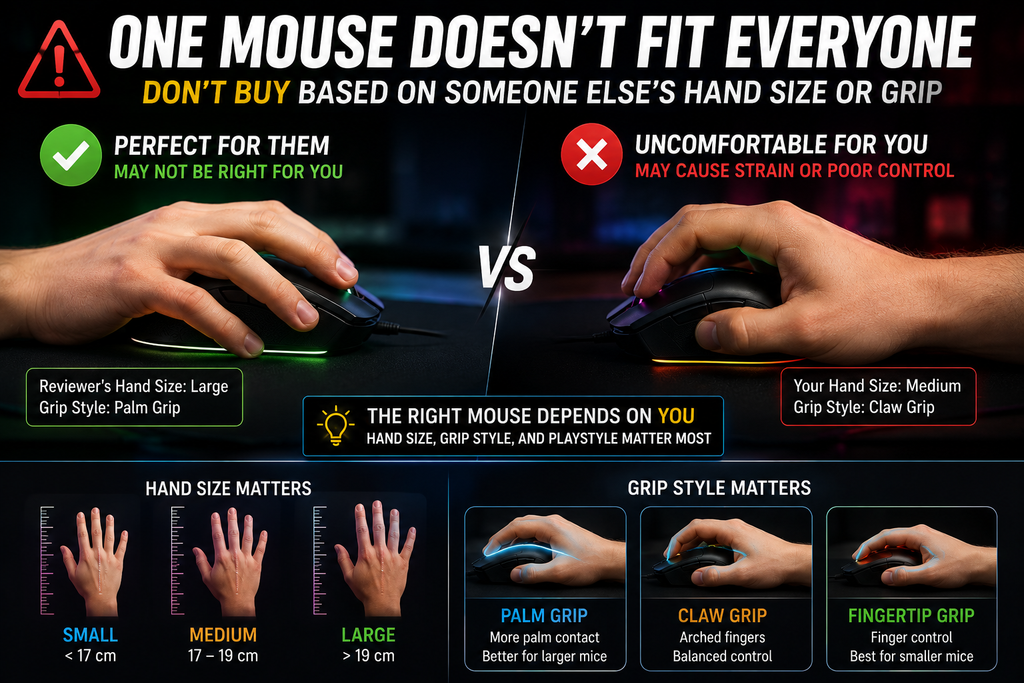
One of the most common mistakes is buying based entirely on a reviewer’s hand size or grip preference. A mouse that feels excellent to one person may feel uncomfortable to another.
Another mistake is focusing too heavily on maximum DPI. You are unlikely to benefit from a massive DPI figure if the mouse shape is uncomfortable.
Gamers also sometimes buy a mouse with too many features. RGB lighting, extreme polling rates, charging accessories, and additional controls can be useful, but they should not distract from the basics.
Before purchasing, ask:
- What games do I play most?
- What grip do I naturally use?
- Do I prefer a lightweight or substantial feel?
- Do I need many programmable buttons?
- Do I want wired or wireless connectivity?
- How large is my hand?
- How much desk space do I have for mouse movement?
These questions will usually narrow the field more effectively than comparing sensor specifications alone.
How to Set Up a New Gaming Mouse
Buying a good mouse is only the first step. Your settings should also fit your games.
Start with a comfortable DPI setting and avoid changing it constantly. Build muscle memory around a sensitivity that allows you to control the cursor and aim comfortably.
In competitive shooters, disable unnecessary mouse acceleration if the game and your operating system settings allow you to maintain consistent input. Then adjust your in game sensitivity gradually rather than making dramatic changes after every bad match.
Program side buttons for commands you use frequently. Avoid filling every button with functions simply because the software allows it.
Finally, use a suitable mousepad. A premium sensor cannot compensate for an unstable, dirty, or unsuitable surface.
Are Expensive Gaming Mice Worth It?
Sometimes, but not automatically.
Premium models can offer lighter construction, advanced wireless technology, high polling rates, improved switches, stronger sensors, and more refined materials. Those features may be valuable for serious competitive players.
For many gamers, however, a mid range mouse with a comfortable shape and reliable sensor will provide nearly all the performance they need.
The biggest improvement often comes from replacing a poorly fitting mouse with one that matches your hand and playstyle. That can matter more than moving from one already capable gaming sensor to another.
How to Find Your Best Gaming Mouse
If you want the simplest buying process, prioritize your decision in this order:
1. Shape and comfort
Choose a design that fits your grip and hand.
2. Game genre
FPS players, MMO players, and general PC users have different needs.
3. Weight
Decide whether quick, low resistance movement or a more substantial design feels better.
4. Connectivity
Choose wired for simplicity or wireless for freedom and a cleaner setup.
5. Buttons
Buy enough controls for your games without adding unnecessary complexity.
6. Sensor and performance features
Modern gaming sensors are already highly capable, so focus on reliable implementation rather than chasing the largest number.
7. Budget
Spend more only when the additional features solve a real need.
Frequently Asked Questions
What is the best gaming mouse overall?
There is no universal best option. A lightweight symmetrical mouse is often ideal for competitive FPS players, while an ergonomic mouse with additional controls may be better for mixed gaming. The best choice depends primarily on shape, grip, game genre, and budget.
Is a lightweight gaming mouse better?
A lightweight mouse can make rapid movements easier, particularly in competitive shooters. It is not automatically better for every game. Players who value extra buttons, larger batteries, or a more substantial feel may prefer a heavier model.
Is wireless good enough for competitive gaming?
Modern performance focused wireless gaming mice are designed for low latency gaming and are widely used in competitive play. Battery life, charging preferences, and cost are now often bigger deciding factors than latency for most players.
How much DPI do I need for gaming?
You do not need the maximum DPI advertised on a gaming mouse. A moderate DPI combined with an appropriate in game sensitivity is sufficient for most players. The ideal setting depends on the game and your personal control preferences.
Is an ergonomic or symmetrical mouse better?
Ergonomic mice are shaped around a specific hand and can provide strong palm support. Symmetrical mice offer a more neutral design and are popular among claw and fingertip players. Neither is universally superior.
Do high polling rates make a big difference?
Higher polling rates can provide more frequent input updates, but the real world benefit varies depending on your PC, monitor, game, and sensitivity to small changes in responsiveness. A reliable 1,000Hz mouse remains more than adequate for most gaming.
Final Thoughts
Finding the best gaming mouse is less about chasing the newest specification and more about understanding how you play. Competitive FPS players may prioritize a lightweight shell and responsive wireless performance. MMO players may need a richer button layout. A gamer who uses the same PC for work, browsing, and games may get more value from an ergonomic, versatile design.
Start with shape and comfort, then consider weight, buttons, connectivity, and performance features. A mouse that feels natural after several hours of use will usually be a better investment than one with impressive specifications that never quite fits your hand.
For current model specifications, the official Razer gaming mice catalog and Logitech G PRO Series are useful starting points when comparing available designs.
LEAVE A PIXEL ZINE COMMENT