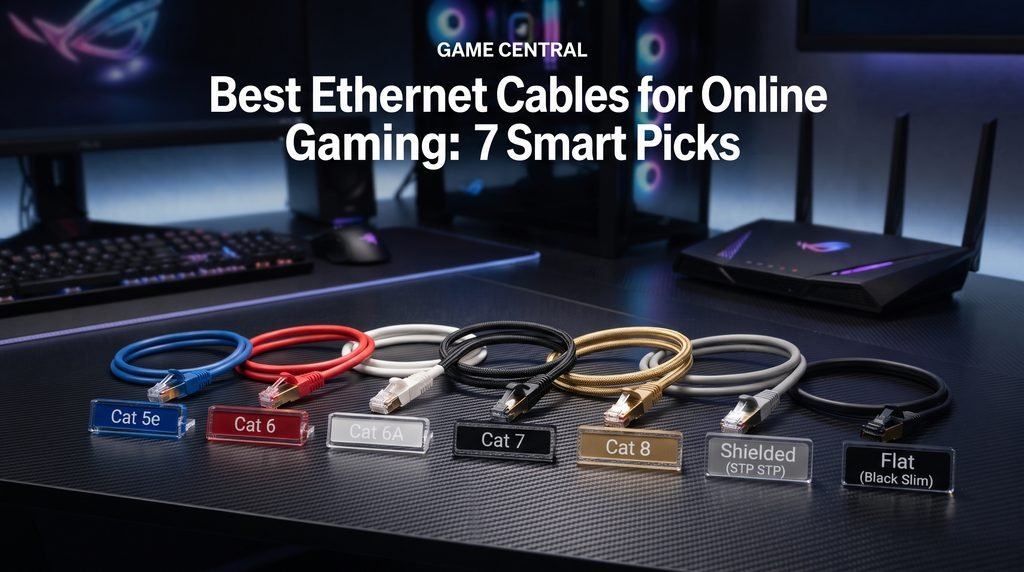
The best Ethernet cables for online gaming are not necessarily the ones with the biggest speed number printed on the package. For most players, a properly made Cat 6 or Cat 6A cable is already more than capable of handling a modern gaming connection.
The bigger benefit of Ethernet is consistency. A wired connection removes the wireless link between your gaming device and router, which can help avoid problems caused by WiFi interference, signal strength, congestion, or distance. PlayStation itself recommends a wired connection when possible for troubleshooting unstable connections, and PS5 supports wired LAN setup directly through its network settings.
That does not mean an expensive Ethernet cable will magically transform a 70 ms connection into 20 ms. Your ISP, physical distance to the game server, routing, router, network congestion, and server conditions have much more influence on internet latency.
So which Ethernet cable should a gamer actually buy?
For most home gaming setups, Cat 6 is the practical sweet spot, while Cat 6A is an excellent choice if you want a longer term 10GbE capable cable or have a longer run. Cat 5e can still work perfectly well for ordinary gigabit connections, while Cat 7 and Cat 8 are generally unnecessary for a typical gaming PC or console.
Why Ethernet Still Matters for Online Gaming
Online games do not require enormous bandwidth compared with activities such as downloading large game files or streaming high resolution video. What matters more during a match is having a stable connection with predictable latency and minimal packet loss.
A wired Ethernet connection creates a direct physical link between your gaming device and router or network switch. It does not have to compete with nearby wireless devices for the same radio connection.
This can be particularly useful if your gaming setup is close enough to the router for a practical cable run.
Consider a typical home:
- The router is in the same room as the gaming PC.
- Several phones and laptops are connected over WiFi.
- A smart TV is streaming video.
- Another console is downloading a game.
- The gaming PC is playing a competitive shooter.
A wired connection does not eliminate congestion elsewhere on the internet, but it removes one variable—the wireless connection between the PC and router.
PlayStation provides a dedicated wired LAN setup for PS5 and PS4, and its support documentation recommends trying a wired connection when dealing with connection problems.
That is why Ethernet remains a sensible choice for competitive games, fighting games, racing games, sports titles, and other multiplayer experiences where connection consistency matters.
What Makes an Ethernet Cable Good for Gaming?
There are several things worth considering before buying a cable.
Cable category and bandwidth
The category printed on an Ethernet cable tells you about its networking performance capabilities.
For a gaming setup, the most relevant categories are Cat 5e, Cat 6, Cat 6A, and, in more specialized circumstances, Cat 8.
Cat 6A is designed for 10GBASE T at distances up to 100 meters, while Cat 6 can support 10GbE over shorter distances depending on the installation. CommScope lists Cat 6 at up to 37 meters for 10G applications under its comparison, while Cat 6A reaches 100 meters.
That distinction matters more for network infrastructure than for the average gaming desk, where the cable may only need to travel a few meters.
Shielding, construction, and durability
A cable’s physical construction can be more important than its maximum advertised speed.
Look for:
- Properly terminated RJ45 connectors
- Strain relief around the connectors
- A cable length that is long enough without excessive slack
- Flexible construction for desktop setups
- Durable outer insulation
- Appropriate shielding if the cable runs through a noisy electrical environment
Shielding can help in environments where electromagnetic interference is a concern, although it is not automatically necessary for a normal gaming room.
For a straightforward PC to router connection, a well made unshielded twisted pair cable can be completely adequate.
Best Ethernet Cable Categories for Gaming
There is no single cable category that is automatically best for every player. The right choice depends on your network hardware, cable length, and whether you expect your network to become faster in the future.
Cat 5e: The Budget Friendly Option
Cat 5e remains relevant for gamers who have ordinary gigabit networking equipment.
It can support Gigabit Ethernet over standard distances, so it is sufficient for many home internet connections and gaming devices.
If you already have a good quality Cat 5e cable and your gaming connection is stable, there is usually little reason to replace it simply because newer categories exist.
The limitation is future headroom.
If you are buying a new cable today and the price difference between a quality Cat 5e and Cat 6 cable is small, Cat 6 is often the more sensible purchase.
Best for: Budget setups and existing gigabit networks.
Cat 6: The Best Overall Choice for Most Gamers
Cat 6 is the category I would recommend to most gamers looking for a practical Ethernet upgrade.
It supports Gigabit Ethernet at standard 100 meter channel distances, and it provides substantially more bandwidth capability than what most current gaming connections require.
For a gaming desk that is connected to a typical home router, Cat 6 offers a strong combination of:
- Performance
- Availability
- Price
- Flexibility
- Future compatibility
It is also widely available in short lengths, making it easy to find a cable that does not leave your gaming setup surrounded by unnecessary loops of wire.
If your router, PC, or console has a gigabit Ethernet port, Cat 6 is already enough to make use of that connection.
Cat 6A: The Best Future Proof Choice
Cat 6A is the more attractive option if you are building a new network or want additional headroom for 10GbE.
According to CommScope, Cat 6A operates at up to 500 MHz and supports 10GBASE T over a maximum channel length of 100 meters. Leviton similarly identifies Cat 6A as supporting 10 Gigabit Ethernet over 100 meters.
For a gamer, that does not mean games will suddenly load faster simply because a Cat 6A cable is installed.
The actual advantage is network capability.
If you have:
- A 10GbE network switch
- A 10GbE capable PC
- A high speed NAS
- A fast local network
- Plans for future networking upgrades
then Cat 6A makes more sense.
It is also an excellent choice for long cable runs where you want 10GbE capability.
Best for: New network installations, 10GbE users, long runs, and future proofing.
Cat 7: Usually More Than You Need
Cat 7 cables often appear in gaming focused listings with impressive specifications and aggressive marketing.
That does not automatically make them a better gaming purchase.
For a normal home gaming setup, Cat 7 provides capabilities that most gaming hardware and internet connections will not use. CommScope notes that Cat 7 is not widely adopted and is not the standard choice for typical RJ45 based networking compared with Cat 6A.
If a good Cat 6A cable costs less and matches your equipment, there is little reason to choose Cat 7 simply because the number is higher.
Cat 8: Impressive, But Excessive for Most Gamers
Cat 8 is designed for very high speed networking environments and can support 25G and 40G applications over shorter distances. It is also backward compatible with lower speed Ethernet applications.
That sounds attractive for gaming, but online gaming rarely demands anything close to those networking speeds.
Unless you have a specialized high speed home network, buying Cat 8 specifically to reduce gaming latency is difficult to justify.
For the average gaming PC, PS5, or Xbox setup, Cat 6 or Cat 6A is usually the more sensible choice.
Cat 6 vs Cat 6A for Gaming
The Cat 6 versus Cat 6A decision is probably the most useful comparison for gamers buying a new cable.
| Feature | Cat 6 | Cat 6A |
|---|---|---|
| Typical gaming use | Excellent | Excellent |
| Gigabit Ethernet | Yes | Yes |
| 10GbE capability | Shorter distances | Up to 100m |
| Bandwidth | Up to 250 MHz | Up to 500 MHz |
| Typical home gaming | More than enough | More than enough |
| Future proofing | Good | Excellent |
| Cost | Usually lower | Usually higher |
| Best use | Standard gaming setup | New/high speed network |
The important point is that both can be excellent gaming cables.
If your gaming PC is connected to a standard gigabit router and your internet plan is well below 1Gbps, buying Cat 6A instead of Cat 6 is unlikely to produce a meaningful change in your in game ping.
Cat 6A becomes more interesting when you are building around 10GbE networking or running a longer cable.
Does a Better Ethernet Cable Lower Ping?
This is one of the biggest misconceptions surrounding gaming Ethernet cables.
A more expensive Ethernet cable does not automatically lower your internet ping.
Ping is influenced by many factors, including:
- Distance to the game server
- ISP routing
- Network congestion
- Server performance
- Local network traffic
- Router behavior
- Packet loss
- Your connection technology
Changing from a functioning Cat 6 cable to a premium Cat 8 cable will not necessarily produce a lower ping.
What Ethernet can do is provide a more predictable local connection between your gaming device and router.
That distinction is important.
If your WiFi connection occasionally suffers interference or fluctuating signal quality, switching to Ethernet may improve your gaming experience. PlayStation specifically recommends a wired connection when possible during connection troubleshooting.
But if you already have a stable wired connection, replacing one certified cable with another higher category cable may have little or no noticeable effect on latency.
How to Choose the Right Ethernet Cable for Your Gaming Setup
Instead of choosing based purely on the largest number on the packaging, work through these questions.
1. What speed does your hardware support?
Check the Ethernet ports on your PC, console, router, and network switch.
A cable capable of 40Gbps cannot force a 1Gbps network port to operate faster.
The slowest relevant component can become the limiting factor.
For many gamers, the network equipment—not the cable—is the real bottleneck.
2. How long does the cable need to be?
Measure the actual route between the router and gaming device.
Do not automatically buy a 30 meter cable when a 5 meter cable is enough.
Excess cable creates unnecessary loops around the desk and can make cable management harder.
At the same time, avoid buying a cable so short that it has to be stretched tightly around furniture.
A little extra length is useful.
3. Are you gaming at a desk or across the house?
For a nearby gaming PC, Cat 6 is generally an easy recommendation.
For a longer installation where you want 10GbE capability, Cat 6A is more attractive.
If the cable must pass through walls, ceilings, or other permanent pathways, pay attention to the cable’s installation rating and local electrical/building requirements rather than buying a generic patch cable.
4. Do you actually need shielding?
Shielded Ethernet can be useful in environments with significant electromagnetic interference.
But shielding is not a magic performance upgrade.
For a normal bedroom or gaming room, a quality UTP cable can be entirely suitable.
The goal should be reliable construction rather than collecting specifications you do not need.
5. Is the connector well protected?
The RJ45 plug is one of the easiest parts of an Ethernet cable to damage.
Look for a connector with decent strain relief, particularly if you frequently move your PC, console, or router.
A broken locking tab can turn an otherwise perfectly good cable into an annoying replacement job.
Common Ethernet Cable Mistakes Gamers Make
Buying Cat 8 to fix high ping
If your problem is a distant game server or poor ISP routing, Cat 8 will not solve it.
Investigate the actual source of the latency first.
Assuming Mbps equals ping
Internet speed and latency are different measurements.
A faster download plan can help with large downloads and network congestion, but it does not automatically mean lower ping to every game server.
Ignoring the router
Your cable can only carry what the connected network equipment supports.
If your router has gigabit ports, installing an expensive cable does not turn those ports into 10GbE.
Buying an unnecessarily long cable
Longer is not automatically better.
Use enough cable to create a clean route while leaving some slack for movement.
Choosing a cable purely because it says “gaming”
A gaming label does not change the fundamental networking standards.
Look at the category, construction, connector quality, length, and certification instead.
Running Ethernet carelessly
Do not sharply bend or crush the cable behind furniture.
Avoid placing it where chairs, doors, or heavy furniture can repeatedly pinch it.
A technically excellent cable can still perform poorly or become unreliable if it is physically damaged.
Best Ethernet Cable Setup for PC, PS5, and Xbox
The basic arrangement is simple:
Gaming device → Ethernet cable → router or network switch → internet connection
For a gaming PC positioned near a router, a quality Cat 6 cable is usually the sensible starting point.
For PS5, Sony provides a wired LAN setup under the console’s network settings.
The same general principle applies to other consoles with Ethernet ports: connect the console directly to the router when practical.
If your router is far away, a network switch can allow multiple wired devices to share one Ethernet run. For example:
Router → Cat 6/Cat 6A cable → network switch → gaming PC + console + other wired devices
That can be useful in a dedicated gaming room.
However, remember that a switch does not increase your internet speed by itself. Its job is to provide additional wired network ports.
What About Flat Ethernet Cables?
Flat Ethernet cables are popular because they can fit underneath rugs, along walls, or beneath certain furniture more easily than thick round cables.
They can be convenient for temporary desktop installations.
However, do not choose a cable solely because it is flat. Pay attention to its category, construction, connector quality, and the manufacturer’s specifications.
For a permanent installation, a properly selected conventional cable is often easier to manage and protect.
Should You Buy a Shielded Ethernet Cable?
Shielding is worth considering if your cable has to run close to sources of electrical interference or through a particularly challenging environment.
For a normal gaming desk, however, shielding should not be treated as a mandatory gaming feature.
A well made Cat 6 or Cat 6A cable without shielding can be completely adequate for online gaming.
The important thing is to match the cable to the environment instead of paying extra for specifications that solve a problem you do not actually have.
So, What Are the Best Ethernet Cables for Online Gaming?
For most players, the answer is surprisingly straightforward.
Cat 6 is the best overall choice for typical gaming setups.
It offers enough capability for gigabit networking and gives gamers a sensible balance between price, availability, performance, and future usefulness.
Cat 6A is the better premium choice if you want 10GbE support across longer runs or are building a faster home network. Cat 6A is specifically designed to carry 10GBASE T to 100 meters.
Cat 5e remains perfectly usable if you already own a good cable and your network is based around gigabit Ethernet.
Cat 7 and Cat 8 are specialized choices, not automatic gaming upgrades.
The most important thing is to avoid confusing cable speed with gaming performance. A premium Ethernet cable cannot overcome a distant server, congested ISP route, overloaded network, or unsuitable router.
A good wired connection is about reliability and consistency.
For a typical gaming PC or console, spending money on a quality Cat 6 cable—and putting the rest of the budget toward better networking hardware if necessary—is usually a smarter move than paying a premium for an unnecessarily high category.
Final Verdict
The best Ethernet cables for online gaming are the ones that match your actual network rather than the ones with the most impressive marketing claims.
For most gamers, Cat 6 is the sweet spot. It is fast enough for common home networks, widely available, and capable of supporting gigabit Ethernet over standard distances.
Choose Cat 6A if you want stronger long term networking capability, particularly for 10GbE and longer runs.
More expensive categories are not automatically better for gaming. If your existing Ethernet connection is already stable, changing from Cat 6 to Cat 8 is unlikely to transform your ping.
Focus on the fundamentals: a reliable cable, suitable length, good connectors, capable router and network ports, sensible cable management, and a stable internet connection.
That is where the real improvement comes from.
FAQ
Is Cat 6 or Cat 6A better for gaming?
Cat 6 is sufficient for most gaming setups. Cat 6A is preferable if you want 10GbE support over longer distances or are building a more future ready network.
Does an Ethernet cable reduce gaming ping?
A wired connection can provide a more consistent connection than WiFi, particularly when wireless interference or signal problems are involved. However, cable category alone does not determine internet ping.
Is Cat 8 Ethernet cable worth it for gaming?
Usually not. Cat 8 is designed for very high speed networking environments, while most gaming PCs and consoles do not need its maximum capabilities.
Is Cat 5e good enough for online gaming?
Yes. Cat 5e can be suitable for gigabit Ethernet, making it adequate for many home gaming setups. If you are buying a new cable, however, Cat 6 is a sensible upgrade.
What Ethernet cable should I use for PS5?
A quality Cat 6 cable is a practical choice for PS5. The console supports wired LAN connections through its Ethernet port and provides a dedicated wired setup option in its network settings.
Does cable length affect gaming performance?
A normal household cable run should not create a meaningful gaming problem when it is within the cable’s supported specifications. Choose a practical length rather than buying an unnecessarily long cable.
Is a shielded Ethernet cable better for gaming?
Not necessarily. Shielding can be useful in environments with electromagnetic interference, but a quality unshielded Cat 6 or Cat 6A cable is usually adequate for a normal gaming room.
What is the best Ethernet cable category for most gamers?
Cat 6 is the best balance for most players. Cat 6A makes more sense when 10GbE capability, longer runs, or future network upgrades are important.
LEAVE A PIXEL ZINE COMMENT