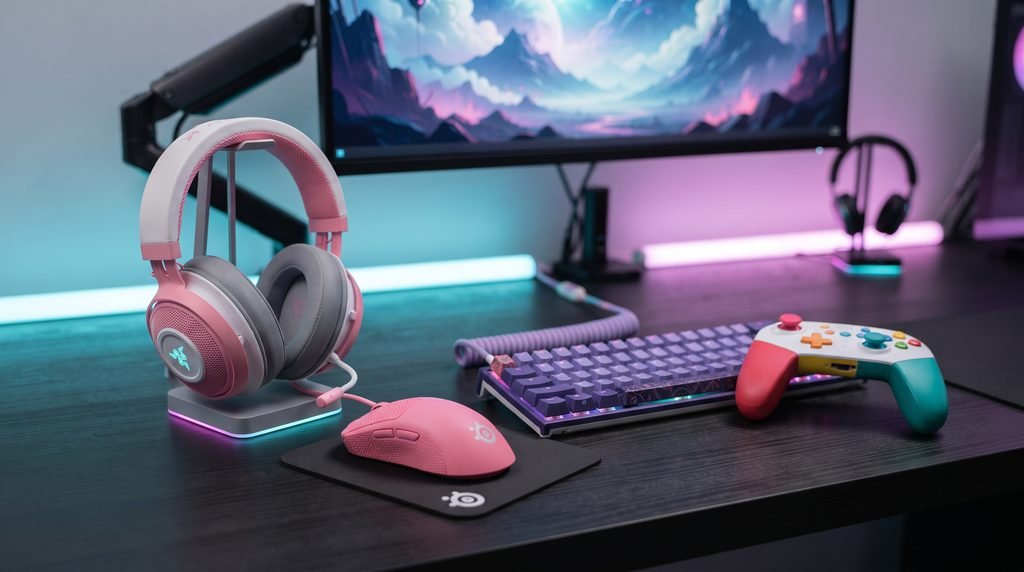
Best Colored Gaming Reviews is a slightly unusual search phrase because it does not point to one specific game, console, or established product category. In practice, the search intent is much closer to finding colorful gaming hardware and peripherals that look distinctive without compromising the things that actually matter during play.
That distinction matters. A pink mouse with poor tracking is still a poor gaming mouse. A purple keyboard with uncomfortable switches will not become better simply because it matches the rest of a desk. And an RGB heavy setup can look impressive in photographs while being distracting or poorly organized in daily use.
The good news is that colorful gaming hardware has become much easier to find. Razer maintains its Quartz Pink collection, Logitech offers select gaming mice in pink, HyperX has white and pink Cloud headsets, CORSAIR sells keyboards in finishes such as Frost White and Atomic Purple, while PlayStation and Xbox offer controllers in multiple colors and finishes.
So the right question is not simply Which gaming gear has the best color?
It is Which colorful gaming gear still deserves a place on a serious gaming desk?
What Colored Gaming Really Means
Colored gaming gear refers to gaming hardware designed around a specific finish, colorway, or visual theme rather than the traditional black and gray appearance common across gaming equipment.
That can mean several things:
- Pink or pastel gaming peripherals
- White gaming keyboards and mice
- Purple gaming hardware
- Blue or green controllers
- Iridescent finishes
- RGB focused equipment
- Matching keyboard, mouse, headset, and controller combinations
- Limited edition gaming hardware
There is an important difference between colored hardware and RGB hardware.
A pink mouse remains pink whether its lighting is turned off. RGB equipment, on the other hand, uses programmable lighting as part of its appearance. A product can be visually colorful without relying on lighting at all.
This gives gamers more freedom when designing a setup.
For example, a clean white desk can work with a pastel pink headset, white keyboard, and purple mousepad. A darker setup can use one brightly colored controller as the focal point instead of covering every surface with RGB lighting.
The strongest setups usually have some visual restraint.
How We Evaluate Colored Gaming Gear
A useful review should not become a popularity contest based on appearance.
For these Best Colored Gaming Reviews, the important criteria are the same ones that should matter when evaluating conventional gaming equipment.
Performance Before Appearance
The first question should always be whether the product performs its intended gaming role.
For a mouse, that means sensor performance, responsiveness, weight, shape, and connection stability.
For a keyboard, switch behavior, layout, key feel, latency, software, and build quality matter more than the color of the keycaps.
For a headset, comfort, microphone quality, sound positioning, connectivity, and long session usability should take priority.
For a controller, ergonomics, button feel, wireless performance, compatibility, and platform specific features are more important than the shell color.
Color should be the deciding factor between good products, not a reason to overlook a bad one.
Comfort, Compatibility, and Build Quality
A colorful product can also create practical problems if its design does not suit the rest of your hardware.
Before buying, check:
- Your platform
- Wired versus wireless connectivity
- Required software
- Desk space
- Hand size and grip style
- Keyboard layout
- Headset fit
- Controller compatibility
- Battery requirements
- Available color variants
Compatibility is particularly important for console accessories.
For example, the Xbox Wireless Controller officially supports Xbox Series X|S, Xbox One, Windows 10/11, Android, and iOS, while PlayStation’s DualSense Chroma Pearl is compatible with PS5, PC, Mac, and mobile devices.
Best Colored Gaming Reviews: 7 Standout Options
Rather than ranking products purely by how attractive they look, these selections represent different ways to introduce color into a gaming setup.
1. Razer Quartz Collection — Best for a Coordinated Pink Setup
Razer Quartz collection is one of the clearest examples of a manufacturer treating color as a complete gaming ecosystem rather than a one off product finish.
The current Quartz range includes products across mice, keyboards, headsets, microphones, mouse mats, and other accessories. Razer’s official collection specifically positions Quartz as a color focused family of gaming peripherals.
That makes it particularly useful for gamers who want consistency.
Instead of buying a pink mouse from one manufacturer, a white headset from another, and a completely unrelated keyboard, you can create a more unified visual theme.
Razer has also maintained the Quartz concept for years. The company introduced its Quartz Pink treatment across multiple gaming products in 2019, including mice, keyboards, headsets, microphones, and accessories.
Best for: Gamers who want a pink focused ecosystem.
Strength: Strong visual consistency across product categories.
Weakness: Choosing gear solely because it matches can lead to compromises if another product better fits your performance needs.
Verdict: One of the strongest options if the visual theme itself is a major part of your setup.
2. Logitech G PRO X SUPERLIGHT 2 — Best Colorful Competitive Mouse
The Logitech G PRO X SUPERLIGHT 2 is a better example of how color can be added to performance focused hardware without turning the product into a novelty.
Logitech lists pink, black, and white versions of the mouse. The official specifications include a maximum tested speed above 888 IPS, up to an 8000Hz report rate with supported features, and a quoted 95 hour battery life under its stated testing conditions.
The key point is that the pink version is not a fundamentally different “fashion” mouse. It remains part of the same performance oriented product family.
For competitive players, that is exactly what you want.
You can choose a color that fits your desk without giving up the core hardware characteristics that made the model attractive in the first place.
Best for: Competitive PC players who want a colorful mouse without moving away from performance focused hardware.
Strength: Strong balance between appearance and competitive specifications.
Weakness: The color itself does not improve performance, so buyers should choose the mouse because its shape and specifications fit their play style.
Verdict: A particularly sensible choice for gamers who want color but refuse to compromise on the fundamentals.
3. HyperX Cloud III S Wireless — Best White and Pink Headset
The HyperX Cloud III S Wireless is a strong choice for gamers who prefer a softer color combination instead of a fully saturated design.
HyperX currently lists a White Pink version alongside other colors. The headset supports 2.4GHz wireless and Bluetooth, with HyperX quoting up to 120 hours of gaming on 2.4GHz and up to 200 hours in Bluetooth mode. It also uses 53mm angled drivers and includes a detachable 10mm boom microphone.
Compatibility is another advantage. HyperX lists support for PC, Mac, PS5, PS4, Nintendo Switch, mobile devices, and Bluetooth devices.
The White Pink finish is particularly easy to incorporate into a bright or pastel gaming setup.
It also avoids a common problem with colorful gaming gear: looking like a novelty product.
The underlying design is still recognizably a mainstream gaming headset.
Best for: PC and console players building a white, pastel, or pink setup.
Strength: Colorful appearance combined with broad connectivity.
Weakness: Gamers focused purely on competitive audio may prefer to compare its sound profile with dedicated esports headsets before buying.
Verdict: One of the better choices for players who want color and practical multi platform flexibility.
4. CORSAIR K65 PLUS — Best Purple or White Keyboard Direction
The keyboard is often the centerpiece of a gaming desk, which makes it one of the easiest places to introduce color.
CORSAIR’s K65 range includes the K65 PLUS in Atomic Purple as well as Frost White versions, alongside other K65 models. CORSAIR describes the range as compact 65% and 60% gaming keyboards, with customizable RGB lighting and different switch technologies across the family.
That compact format has a practical benefit.
A 60% or 65% keyboard frees up desk space around the mouse, which can be useful for players who use larger mouse movements or simply prefer a less crowded workstation.
The visual appeal is also easier to control than an entire desk covered in matching hardware. A purple keyboard can become the main accent while the mouse, headset, and monitor remain neutral.
Best for: PC gamers who want the keyboard to be the main visual feature.
Strength: Compact formats and multiple color directions.
Weakness: Keyboard preferences are highly personal; switch type and layout should be evaluated before color.
Verdict: A good example of using one colorful component as the centerpiece rather than turning every accessory into a visual statement.
5. PlayStation DualSense Chroma Pearl — Best Colorful Console Controller
The DualSense is already one of the more visually distinctive modern console controllers, but Sony’s color range makes it particularly interesting for colorful setups.
The Chroma Pearl version uses an iridescent finish that shifts through pink and cream tones. Sony also lists other Chroma finishes, including Chroma Teal and Chroma Indigo, along with colors such as Galactic Purple, Nova Pink, Cobalt Blue, and Volcanic Red.
The Chroma Pearl model is not merely decorative.
The controller retains DualSense features such as haptic feedback and adaptive triggers, while Sony lists compatibility with PS5, PC, Mac, and mobile devices for the Chroma Pearl version.
For console gamers, this is arguably one of the easiest ways to introduce color without changing the entire setup.
Best for: PS5 owners who want a visually distinctive controller.
Strength: Strong color design combined with DualSense functionality.
Weakness: The controller’s additional capabilities still depend on game and platform support.
Verdict: One of the strongest choices when you want a colorful upgrade that remains immediately practical.
6. Xbox Wireless Controller — Best for Color Choice
Xbox takes a different approach.
Instead of building the visual identity around one signature color, Microsoft offers the Xbox Wireless Controller in multiple colors, including white, blue, red, Volt, pink, green, and purple, alongside Xbox Design Lab customization.
This makes the controller particularly useful for gamers who already have a specific color palette in mind.
The controller also has practical features including textured grip, a hybrid D pad, a dedicated Share button, Bluetooth connectivity, and compatibility across Xbox consoles, Windows PC, Android, and iOS.
That combination makes it less about choosing the “prettiest” controller and more about matching the hardware to your setup.
Best for: Xbox and multi device gamers who want broad color options.
Strength: Wide color selection and customization.
Weakness: Color availability and pricing can vary by market and retailer.
Verdict: A particularly flexible option for gamers who want their controller to match an existing setup theme.
7. Razer Kraken Kitty V3 X — Best for a More Playful Setup
Not every colorful gaming setup needs to look minimal or understated.
The Razer Kraken Kitty V3 X takes a more expressive approach, combining a gaming headset with its recognizable cat ear design. Razer currently lists Quartz, Black, and White versions.
This type of product makes sense for streamers and players who want the gaming setup itself to be part of their personality.
It is less appropriate for someone building an ultra minimal professional looking workstation.
That is not necessarily a criticism. Gaming hardware does not have to follow one aesthetic.
The important thing is matching the product to the purpose of the setup.
Best for: Streamers, content creators, and gamers who prefer playful hardware.
Strength: Strong visual identity.
Weakness: The distinctive design will not suit every gaming room.
Verdict: A good reminder that colorful gaming can mean personality and character rather than simply pastel hardware.
Which Colorful Gaming Gear Is Best for Different Players?
There is no universal winner because different gamers are trying to solve different problems.
| Player Type | Best Direction | Why |
|---|---|---|
| Competitive PC gamer | Logitech G PRO X SUPERLIGHT 2 | Color without abandoning performance focused design |
| Pink setup enthusiast | Razer Quartz | Broad ecosystem for matching peripherals |
| White/pink setup | HyperX Cloud III S | Strong headset option with a soft color combination |
| Purple keyboard fan | CORSAIR K65 PLUS | Atomic Purple provides a clear desk accent |
| PS5 player | DualSense Chroma Pearl | Distinctive finish plus DualSense features |
| Xbox player | Xbox Wireless Controller | Multiple colors and Design Lab |
| Streamer | Razer Kraken Kitty V3 X | Strong visual identity for camera facing setups |
The table highlights an important principle: the best colored gaming product depends on what you want the color to accomplish.
If the goal is competitive performance, start with the hardware.
If the goal is visual cohesion, consider an ecosystem.
If the goal is content creation, choose products that reinforce your on camera identity.
How to Build a Colorful Gaming Setup Without Overdoing It
A colorful gaming setup becomes much easier to manage if you choose a simple palette first.
A three color approach works well:
Base color: White, black, gray, or another neutral.
Primary accent: Pink, purple, blue, green, or red.
Lighting color: A complementary RGB tone.
For example, a white desk with pink peripherals and soft purple lighting creates a different visual effect from an all pink setup with bright red RGB.
The first approach gives the eye somewhere to rest.
Start With One Hero Product
You do not need five matching products.
A colorful keyboard can be enough.
So can a controller.
Or a headset.
Once the centerpiece is selected, choose neutral accessories around it.
This approach also makes upgrades cheaper. You can replace one item later without having to rebuild the entire setup.
Match Materials as Well as Colors
Two products can have the same color but still look completely different.
Glossy plastic, matte plastic, aluminum, rubber, fabric, and translucent materials reflect light differently.
A pastel keyboard with matte keycaps may look excellent next to a soft finish mouse, while a glossy controller could become the visual accent.
This is why setup design should consider finish and texture, not only color.
Use RGB as Supporting Light
RGB lighting works best when it supports the hardware instead of overpowering it.
A desk with five different RGB effects running simultaneously can look chaotic.
A restrained lighting profile can make the colored hardware easier to appreciate.
If your main products are pink and white, for example, soft pink, purple, or neutral white lighting may create a more coherent visual result than cycling through every available RGB effect.
Common Mistakes When Buying Colored Gaming Gear
Buying for Color Alone
This is the easiest mistake to make.
A product may be exactly the shade you want but have an uncomfortable shape, poor software, limited compatibility, or inadequate performance.
Always evaluate the hardware first.
Ignoring Platform Compatibility
A beautiful accessory is useless if it does not work properly with your platform.
Check compatibility before buying, especially with wireless headsets, keyboards, mice, controllers, and console accessories.
Mixing Too Many Accent Colors
Pink, purple, cyan, green, orange, and red can all look good independently.
Together, they can become visual noise.
Choose one or two accent colors and allow neutral surfaces to balance them.
Forgetting Maintenance
White and pastel hardware can show dirt more visibly than dark hardware.
That does not mean you should avoid it.
It means cleaning should become part of your setup routine.
Keyboards, mouse shells, desk mats, and controller surfaces benefit from regular cleaning, especially in high use environments.
Paying More Simply for a Limited Color
A special color can make a product more desirable, but the premium should make sense.
If two versions perform identically and one costs substantially more solely because it is a limited color, decide whether the aesthetic difference is actually worth the extra money.
Are Colored Gaming Products Worth Buying?
Yes — if the underlying hardware is good.
Color itself does not improve frame rates, reduce input latency, increase accuracy, or make a headset sound better.
What color can do is improve the relationship between the player and the physical gaming space.
That matters more than it might initially seem.
A setup that feels organized and personally appealing can make a gaming desk more enjoyable to use. For streamers, appearance also becomes part of the visual identity of the content.
The strongest examples in these Best Colored Gaming Reviews are therefore not necessarily the brightest products.
They are the products where design and function work together.
Razer’s Quartz ecosystem demonstrates how a manufacturer can build an identifiable visual theme. Logitech’s pink PRO X SUPERLIGHT 2 demonstrates that performance focused hardware can also have a distinctive finish. HyperX’s White Pink Cloud III S combines a softer aesthetic with multi platform connectivity, while Sony and Microsoft give console players multiple ways to personalize their controllers.
That is the real lesson behind colorful gaming hardware.
Buy the performance you need, then choose the color you love.
Conclusion
The phrase Best Colored Gaming Reviews may sound like a search for a simple list of colorful products, but the better approach is to judge gaming gear from both sides: appearance and function.
Razer offers one of the clearest ecosystems for gamers who want a coordinated pink theme. Logitech shows that a performance oriented mouse can still offer a distinctive color option. HyperX provides a practical white and pink headset, while CORSAIR gives keyboard buyers more colorful directions. PlayStation and Xbox make personalization particularly easy through their broad controller color selections.
The best choice ultimately depends on your setup and priorities.
If competitive performance comes first, choose the hardware that fits your play style and then select the color.
If aesthetics matter equally, look for products that belong to the same visual family.
And if you are building a setup from scratch, start with one standout colored component rather than buying an entire matching collection immediately.
A great gaming setup does not need to be black, covered in RGB, or built around the latest trend. A carefully chosen color palette can make it feel more personal without getting in the way of the gaming itself.
FAQ
What does colored gaming mean?
Colored gaming generally refers to gaming hardware and setups built around distinctive colors, finishes, or visual themes. This can include pink, purple, white, blue, green, iridescent, and RGB focused gaming products.
Is colorful gaming gear only about appearance?
No. The color is primarily aesthetic, but the underlying products can still offer serious gaming performance. The important thing is to evaluate performance, ergonomics, connectivity, compatibility, and durability separately from appearance.
What is the best color for a gaming setup?
There is no objectively best gaming color. White, pink, purple, blue, green, and black can all work well. The best choice depends on your room, desk, lighting, existing hardware, and personal preference.
Is pink gaming gear good for competitive gaming?
Yes. Color does not determine gaming performance. For example, Logitech offers the PRO X SUPERLIGHT 2 in pink while maintaining the model’s performance oriented specifications.
What is a good colorful gaming controller?
The PlayStation DualSense Chroma Pearl is a strong option for PS5 players who want an iridescent pink and cream finish, while Xbox offers its Wireless Controller in multiple colors and also provides customization through Xbox Design Lab.
Can colorful gaming gear work in a professional looking setup?
Absolutely. The easiest approach is to use one strong accent color with neutral furniture and accessories. White, gray, or black can provide a visual base while pink, purple, blue, or green becomes the accent.
Should I buy matching gaming peripherals?
Not necessarily. Matching peripherals can create a cohesive setup, but choosing each product independently often gives you better performance and value. A mixed setup can still look intentional if you maintain a consistent color palette.
Does RGB lighting make a gaming setup better?
RGB does not inherently improve gameplay. It is mainly an aesthetic feature. Good lighting can improve the appearance of a setup, but excessive lighting can make the space look cluttered, particularly when multiple devices use different effects.
LEAVE A PIXEL ZINE COMMENT